How to Perform an SEO Audit in 7 Simple Steps
Master a 7-step SEO audit framework to uncover technical issues, improve rankings, strengthen visibility, and keep your website competitive in 2026.

An SEO audit is a structured review of a website's technical health, content quality, and search visibility. Performing one involves seven steps: checking indexing, reviewing technical health, auditing content, analyzing keywords, checking backlinks, reviewing user experience, and benchmarking competitors. Regular audits catch ranking issues before they cost you traffic.
Most businesses treat an SEO audit as a one-time cleanup rather than an operating discipline. That worked when search was simpler. In 2026, Google's AI Overviews will appear on roughly 48 percent of tracked search queries, according to BrightEdge data reported in February 2026. Ranking well in traditional results no longer guarantees visibility on its own.
A site that isn't audited on a recurring schedule accumulates small technical and content issues. These compound quietly until traffic drops in a way that's hard to trace back. Book a Free Consultation with WellsGroup's search visibility team.
What Is an SEO Audit and Why Does It Matter?
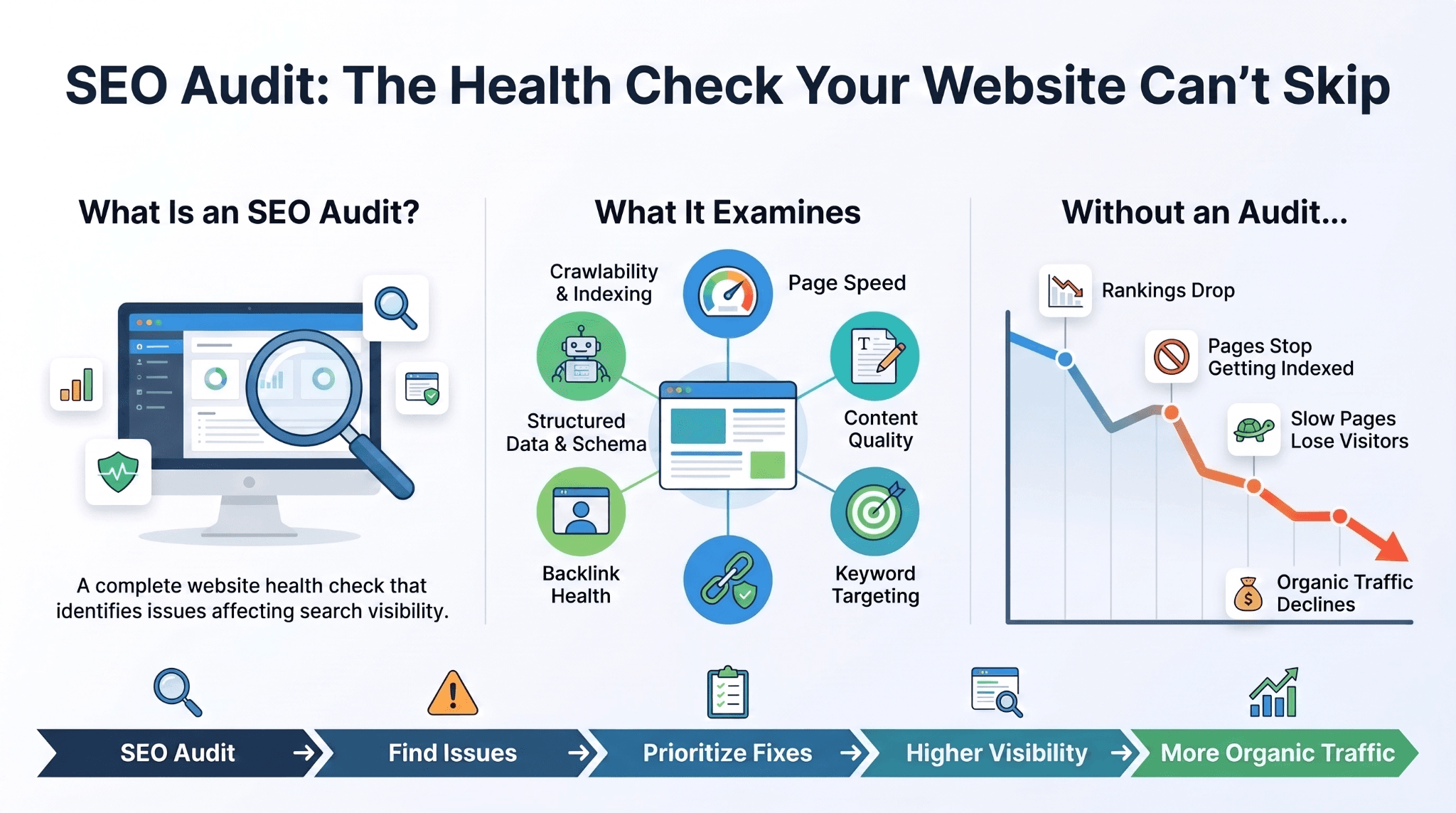
An SEO audit is a systematic review of every factor that determines whether a website can be found, understood, and trusted by search engines and AI systems.
That includes:
-
Crawlability and indexing
-
Page speed and technical health
-
Content relevance and depth
-
Keyword targeting
-
User experience
The term gets used loosely, so precision helps. A seo audit is not a single report or a one-time scan. It is a diagnostic process that produces a prioritized list of issues, ranked by how much each one is likely to cost you in traffic or revenue if left unaddressed.
Skipping this process rarely causes a dramatic, easy-to-notice failure. Instead, a site loses visibility gradually:
-
A page that used to rank on page one slips to page two
-
An old blog post stops getting indexed
-
A slow-loading product page loses mobile visitors before they ever reach checkout
None of these events looks alarming alone. Together, they explain why organic traffic can decline by 20 or 30 percent over a year without one obvious trigger.
What Should You Check Before Starting Your SEO Audit?
Before running any diagnostic, confirm access to the data sources that will make the audit useful rather than guesswork. This means Google Search Console, Google Analytics, and a crawling tool such as Screaming Frog or Ahrefs Site Audit.
Next, decide the scope. A full site audit suits a first-time review or an annual check. A section-specific audit, focused on a product category or a blog, works better when you already know where the problem likely sits.
Two lines of preparation before the checklist. Most teams get the most consistent results by working from a fixed reference document rather than starting from memory each time.
-
Confirm admin access to Search Console and Analytics before scheduling the audit
-
Choose a seo audit checklist or seo audit template so every review covers the same ground
-
Set a baseline snapshot of current rankings, traffic, and conversions to measure against later
-
Decide whether the audit will be run internally or handled by a seo audit service
Using the same seo audit template every quarter also makes results easier to compare over time, which is often more valuable than any single audit on its own. Teams that skip a written seo audit checklist tend to miss the same issues repeatedly, simply because nothing forces a consistent review.

What Are the 7 Steps to Perform an SEO Audit?
Each step below targets a different layer of the site. The sequence starts with whether Google can access your pages at all and ends with how you compare to the competitors already ranking above you.
Skipping a step tends to leave a blind spot that shows up later as an unexplained traffic drop.
Step 1: Is Your Site Fully Indexed by Google?
Start in the Search Console Coverage report. Check for:
-
Pages marked "Excluded" that should be live
-
Important pages blocked by a robots.txt rule
-
Pages carrying an accidental noindex tag
It's common to find that a staging site setting was never removed after a redesign, quietly blocking search engines from key pages for months. Confirming index status first prevents wasted effort auditing pages Google can't even see.
Step 2: Does Your Technical SEO Audit Reveal Site Speed or Crawl Issues?
This is the core of any seo technical audit. Review Core Web Vitals in Search Console, focusing on:
-
Largest Contentful Paint (LCP)
-
Interaction to Next Paint (INP)
-
Cumulative Layout Shift (CLS)
Google tightened its Good LCP threshold from 2.5 seconds to 2.0 seconds in its March 2026 core update. According to HTTP Archive and Google data reported in mid 2026, only about 42 percent of mobile sites currently pass all three Core Web Vitals metrics, even though mobile now accounts for the majority of eCommerce traffic.
A seo technical audit should also flag broken internal links, duplicate pages, and crawl errors that waste limited crawl budget.
Step 3: Is Your Content Still Answering Search Intent?
Search intent shifts over time even when a page's ranking keyword doesn't. Review your top pages and ask whether the content still matches what someone searching that term wants today.
Flag these issues as you go:
-
Thin pages that never fully answer the question
-
Outdated content referencing old pricing or old years
-
Duplicate pages competing for the same intent
Consolidating overlapping pages into one authoritative page usually outperforms leaving several weak ones live.
Step 4: Are You Targeting the Right Keywords?
Pull a report of the keywords each page currently ranks for and compare it against your actual business goals. It's common to find a page ranking well for a term that brings traffic but never converts.
Also check for keyword cannibalization, where two or more pages compete for the same term and split the ranking signal instead of reinforcing a single page's authority.
Step 5: What Do Your Backlinks Say About Your Site's Authority?
Review your referring domains in Ahrefs, Semrush, or Search Console's Links report. Look for:
-
A healthy mix of relevant, authoritative referring sites
-
Spammy or irrelevant domains dragging down trust signals
-
Link gaps where competitors are earning coverage you aren't
If a competitor earns links from a publication you haven't approached, that's a concrete gap rather than a vague suggestion.
Step 6: Is Your Website Easy to Use on Every Device?
Search engines increasingly treat user experience as a proxy for content quality, since a confusing site produces short visits and quick returns to the results page. Check:
-
Navigation clarity
-
Mobile layout and tap targets
-
How easily a visitor finds the page they landed on
Sites that pass all three Core Web Vitals metrics see meaningfully lower bounce rates than sites that fail them, reinforcing that speed and usability are connected rather than separate concerns.
Step 7: How Does Your Site Compare to Competitors?
Benchmark your rankings, content depth, and backlink profile against the sites currently outranking you for your priority keywords. This step turns an internal audit into a competitive strategy, showing exactly what the top-ranking pages are doing that yours isn't yet.
How Is a Local SEO Audit Different From a Standard Audit?
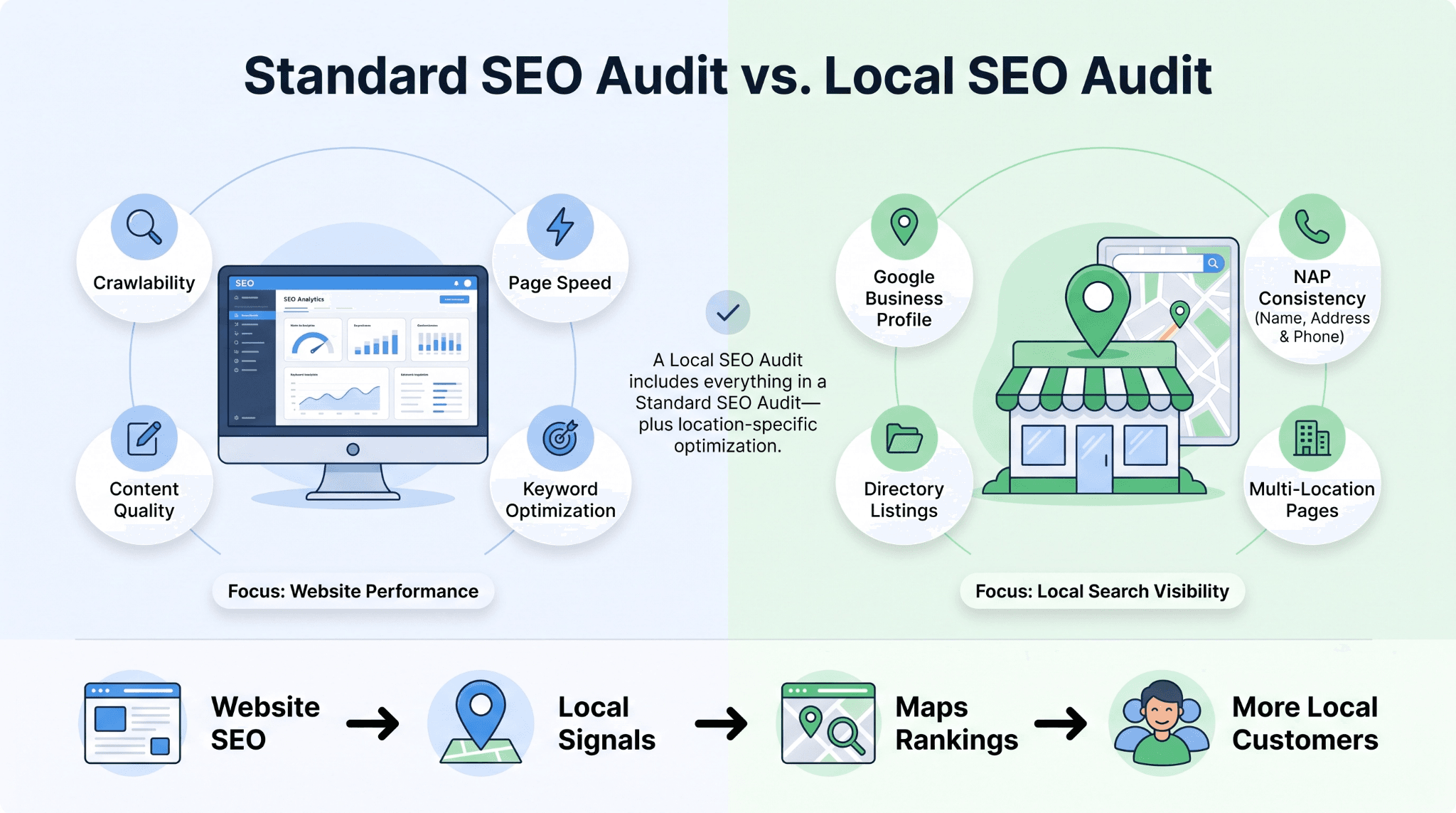
A local seo audit adds a layer that a standard site review doesn't cover: how a business appears across location-based search results and map listings.
This includes:
-
Reviewing the accuracy of your Google Business Profile
-
Confirming NAP consistency (name, address, phone number) across directories
-
Checking for duplicate or outdated location listings that confuse search engines and customers alike
For businesses with multiple locations, a local seo audit also needs to check that each location page targets its own geographic keywords rather than duplicating content across city pages, which search engines can read as low-value or spun content.
What Does an Ecommerce SEO Audit Need That Others Don't?
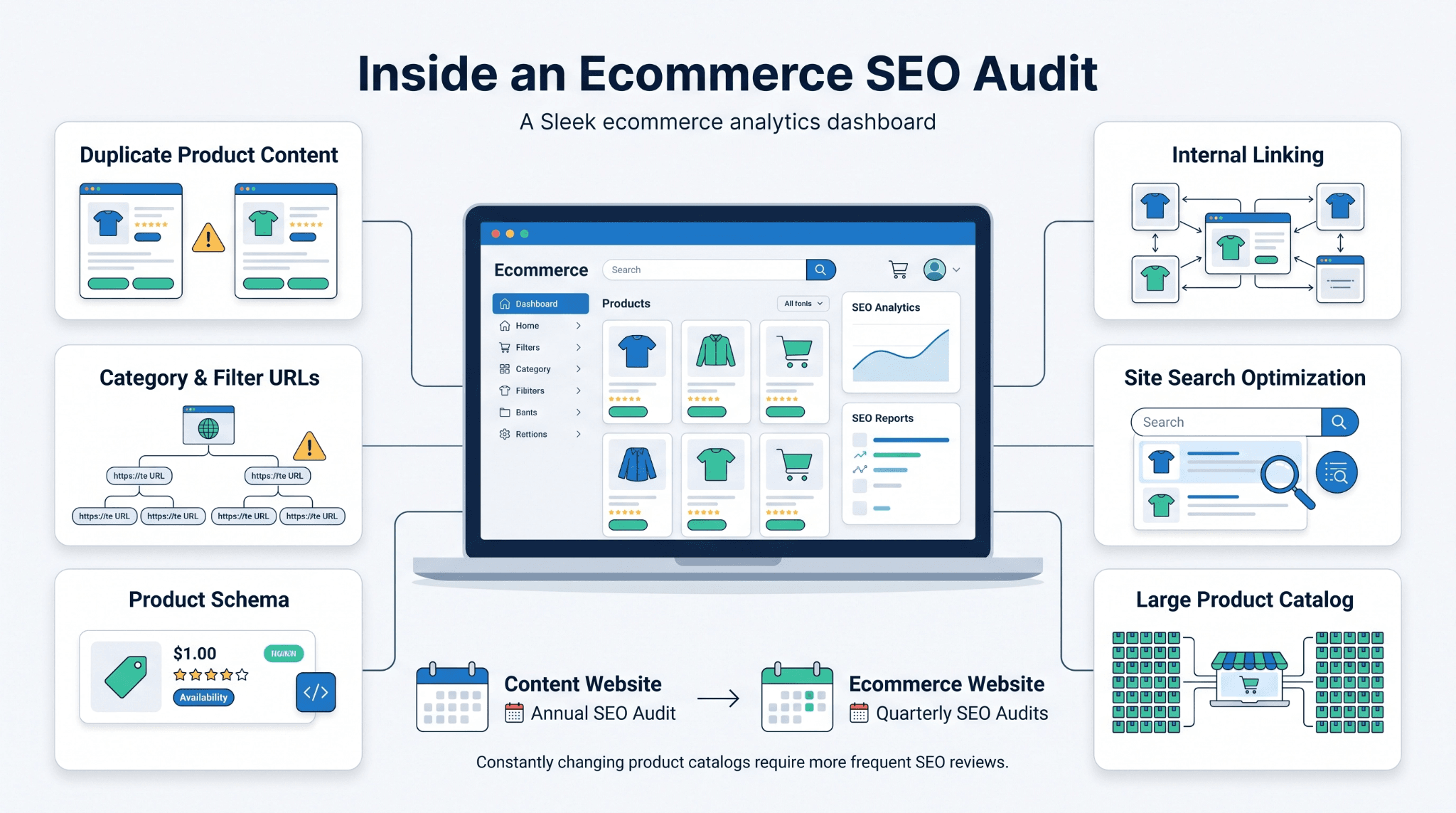
An ecommerce seo audit has to account for scale in a way a service business site doesn't. A catalog with thousands of SKUs creates duplicate content risk, thin product descriptions, and category pages competing with each other for the same terms.
Two lines before the specifics. The most common issues in an ecommerce seo audit repeat across nearly every online store, regardless of platform.
-
Duplicate product descriptions pulled directly from manufacturer feeds
-
Category and filter pages generating near duplicate URLs
-
Missing or incomplete schema markup for products, reviews, and pricing
-
Weak internal linking between related products and categories
-
Site search functionality that isn't indexed or optimized
Because product catalogs change constantly, an ecommerce seo audit benefits from a shorter cycle, often quarterly, rather than the annual cadence that works for smaller content sites.
Should You Use an SEO Audit Template or Hire an SEO Audit Service?
The right choice depends on site size, technical complexity, and how much internal time your team has.
-
A seo audit template works well for a small site with simple architecture and a team member who can commit a few hours to the review.
-
A seo audit service becomes the more efficient option once a site has real technical debt, a large content library, or several stakeholders who need findings turned into a prioritized action plan rather than a raw checklist.
Two lines before the comparison. The table below breaks down where each approach tends to fit best.
|
Factor |
SEO Audit Template (DIY) |
SEO Audit Service |
|
Best for |
Small to mid-sized sites |
Larger, complex, or high-traffic sites |
|
Time investment |
Several hours per audit |
Handled by an outside team |
|
Technical depth |
Covers standard checks |
Includes deeper technical and competitive analysis |
|
Ongoing monitoring |
Manual, depends on the team follow-up |
Often built into an ongoing engagement |
|
Cost |
Low, most of the time |
Higher, but scoped to findings |
What Readers Often Ask About SEO Audits
A few questions come up in nearly every conversation about running or commissioning an audit. Here are direct answers to the most common ones.
How long does an SEO audit take?
Timelines range from a few hours for a small site to several weeks for a large ecommerce catalog, depending on page count and depth of review. WellsGroup scopes this upfront during onboarding, so clients get a firm timeline rather than an open-ended estimate.
What does an SEO audit include?
A complete audit covers indexing, technical health, content quality, keyword targeting, backlinks, and user experience, the same seven areas this framework covers. Our audits go further by tying each finding to a prioritized fix, not just a list of problems.
How much does an SEO audit service cost?
Pricing varies by site size and depth of analysis, from a few hundred dollars for a small site to several thousand for an enterprise review with ongoing monitoring. WellsGroup scopes pricing around site size and the goals behind the request, so clients aren't paying for analysis they don't need.
How often should you run an SEO audit?
Most sites benefit from a full audit annually, with lighter technical checks quarterly. Sites with frequent content changes, such as ecommerce stores, should check technical health every quarter, one reason we build ongoing monitoring into its engagements rather than treating the audit as a one time event.
Can I do an SEO audit myself using a template?
For a straightforward, smaller site, yes, a seo audit template can get you most of the way there. For a site with real technical complexity or competitive pressure, most teams find it faster and more reliable to bring in a seo audit service, since a template can flag issues but can't prioritize them the way an experienced team can.
Turning Your SEO Audit Into a Growth Plan
An SEO audit is not a finish line. It's a snapshot that tells you where to focus next, and its value depends entirely on what happens after the findings are documented.
The sites that improve consistently treat the audit as a recurring input into an operating system. They prioritize fixes by revenue impact rather than working a checklist top to bottom. A broken redirect on a low traffic page matters far less than a Core Web Vitals failure on your best converting page.
Revisit the process on a fixed schedule rather than waiting for a visible traffic drop to prompt the next review. By the time a decline shows up in analytics, the underlying issue has usually been compounding for months.
Want a system built around your audit findings rather than a one time report? Get a Proposal from WellsGroup.