Business Process Automation Workflows: A 2026 Starter Guide
Discover how business process automation streamlines workflows, reduces errors, boosts efficiency, and helps businesses scale smarter with practical 2026 strategies.

Business process automation uses software to run repetitive business tasks, such as data entry, approvals, and notifications, without manual effort. It reduces errors, saves time, and frees teams for higher value work. In 2026, most companies rely on workflow automation tools to connect systems, standardize processes, and scale operations without adding headcount.
This guide treats business process automation as an operating system, not a single tool. It covers how BPA actually works inside a live business, real BPA examples across departments, the measurable benefits companies report, and what separates a working implementation from one that stalls after launch.
Get a Proposal, and our team will map out where automation can save your business the most time, starting with a free review of your current workflows.
What Is Business Process Automation?
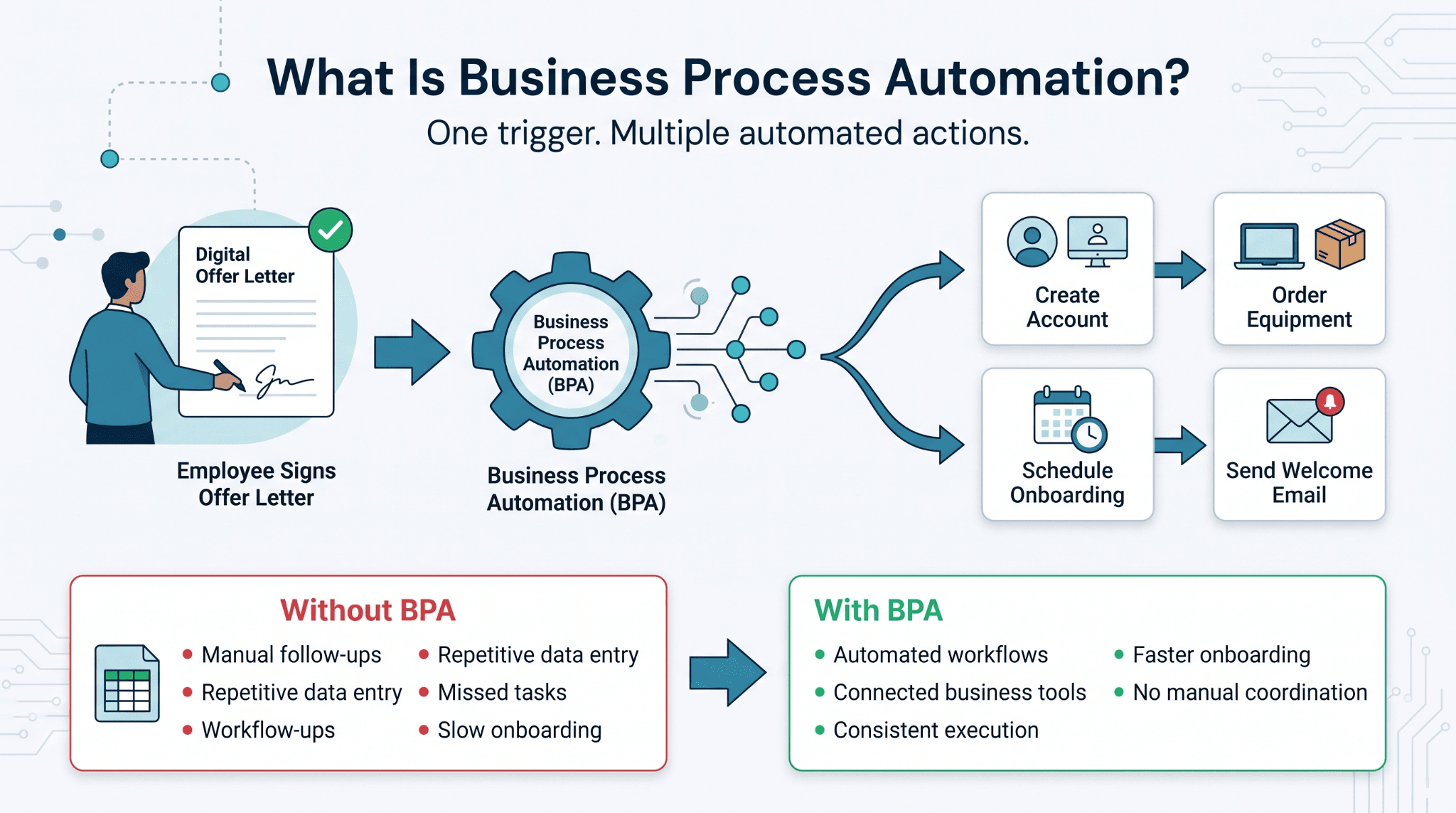
Business process automation, often shortened to BPA, is the use of software to complete a defined business task that previously required a person to start, monitor, or finish it manually. This is different from a single scheduled email or reminder. BPA connects an entire sequence of steps, decisions, and handoffs into one continuous system, rather than automating one action in isolation.
A simple example makes this concrete. When a new employee signs an offer letter, business process automation can trigger:
-
Account creation
-
Equipment ordering
-
Onboarding calendar invites
-
A welcome email
All of this happens without anyone touching a spreadsheet. The technology usually sits underneath tools teams already use, including HubSpot, Salesforce, Zoho, and similar platforms. What changes is how those tools are connected and governed.
For companies scaling past 20 or 30 employees, this matters. Manual coordination breaks down faster than most founders expect. Business process automation becomes less about convenience and more about keeping operations reliable as headcount grows.
What Problems Does Business Process Automation Solve?
Most companies do not adopt business process automation because it sounds modern. They adopt it because a specific process broke down first. Common failure points include:
-
Approvals that stall in someone's inbox
-
Data entered twice into two different systems
-
Customer requests that fall through the cracks between departments
These are coordination problems, not purely technical ones. Information has to pass through a person at every step, and every person is a potential bottleneck.
A logistics company dispatching hundreds of shipments a day cannot rely on a coordinator manually checking each carrier update. A SaaS company onboarding dozens of new accounts a month cannot have a support rep manually provisioning every account by hand.
Business process automation solves this by removing people from steps that do not require judgment, and keeping them focused on the steps that do. The clearest way to see this is to look at what happens when a manual process is left unchanged as a company grows.
Why Do Manual Processes Slow Businesses Down?
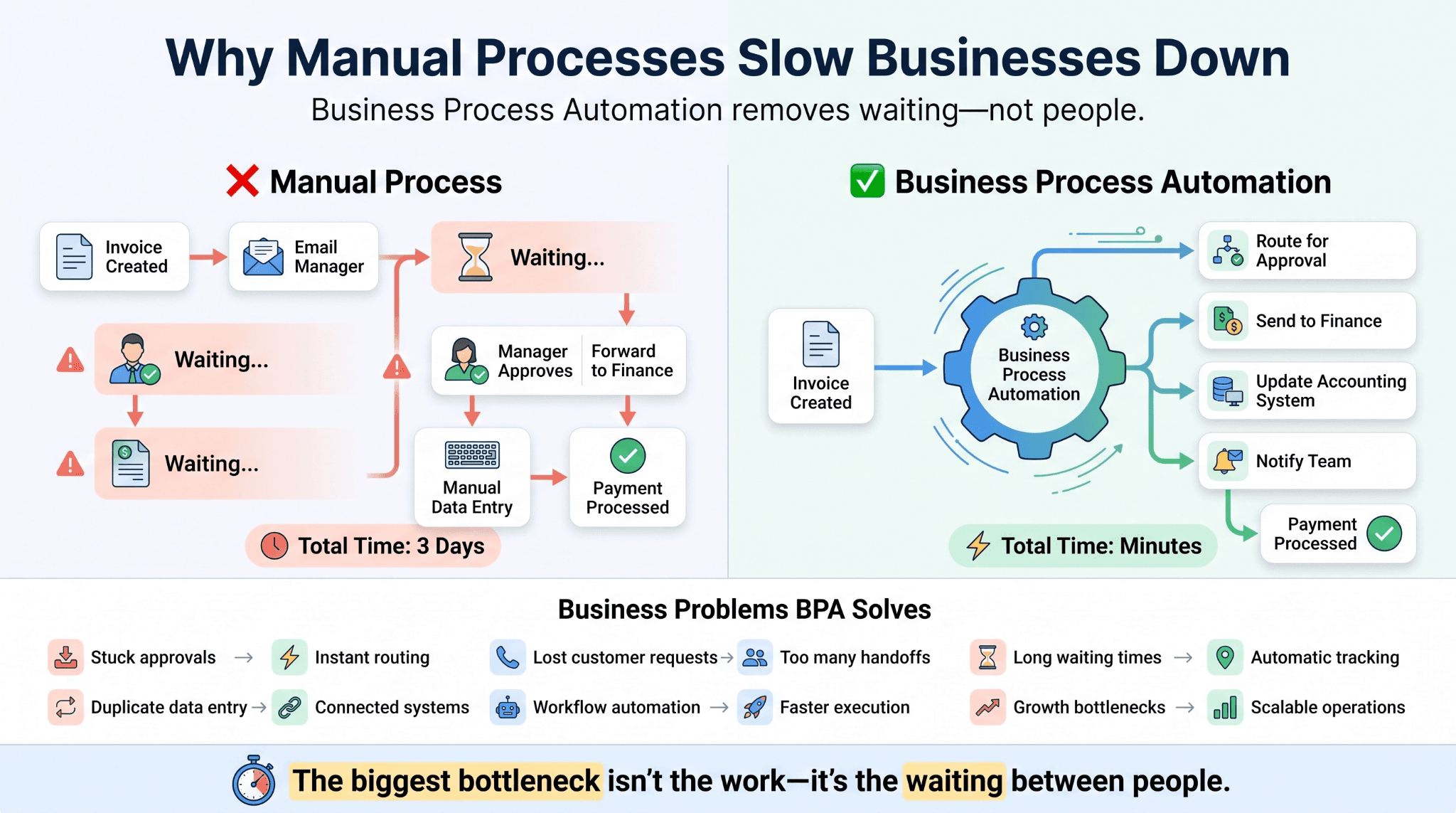
Manual processes slow down for a simple reason. Every additional handoff between people adds waiting time, even when each person responds quickly. Take invoice approval as an example. A manual version might involve:
-
An email to a manager
-
A wait for their availability
-
A forwarded message to finance
-
A manual entry into accounting software
Each step depends on someone being free, checking their inbox, and remembering the task. None of these steps are individually difficult. They are simply slow, and slowness compounds. A task that takes ten minutes of actual work can take three days of calendar time once waiting is included.
This is the core issue business process automation addresses. It does not make individual tasks smarter. It removes the waiting between them.
How Does Business Process Automation Work?
At a technical level, business process automation runs on three components:
-
A trigger: An event, such as a new form submission, a status change in a CRM, or a payment received
-
A rule: The condition that decides what happens next, such as deal size, region, or account type
-
An action: The actual task, such as sending a notification, updating a record, assigning a ticket, or creating a task in a project management tool
Workflow automation platforms such as Zapier or native automation inside Salesforce and HubSpot connect these three components across multiple applications instead of just one. What makes this work at scale is consistency. The logic is defined once and applied the same way every time the trigger fires.
A person does not need to remember the rule. The system enforces it, which is also why business process automation reduces errors more reliably than staff training alone. Understanding the trigger, rule, and action structure is useful in theory. It becomes clearer when applied to real workflows companies run every day.
What Are Some Common BPA Examples?
Some of the most common BPA examples show up in departments that handle a high volume of repetitive requests.
A few patterns repeat across industries, and most companies will recognize at least one of them:
-
HR onboarding: A signed offer letter triggers account setup, equipment requests, and a scheduled first day sequence
-
Invoice and billing workflows: An incoming invoice is matched against a purchase order and routed for approval automatically
-
Customer support ticket routing: A request is tagged by urgency and assigned to the right team without manual sorting
-
Inventory and restocking: Sales data triggers a reorder once stock falls below a set threshold
-
Lead routing: A new form submission is scored and assigned to the right sales rep by territory or deal size
These BPA examples share a common structure. Each one replaces a manual decision with a rule that already existed, just not written down consistently.
A logistics company might automatically notify a customer when shipment status changes. An eCommerce brand might flag an order when the shipping address does not match the billing address.
What Are the Benefits of Process Automation?
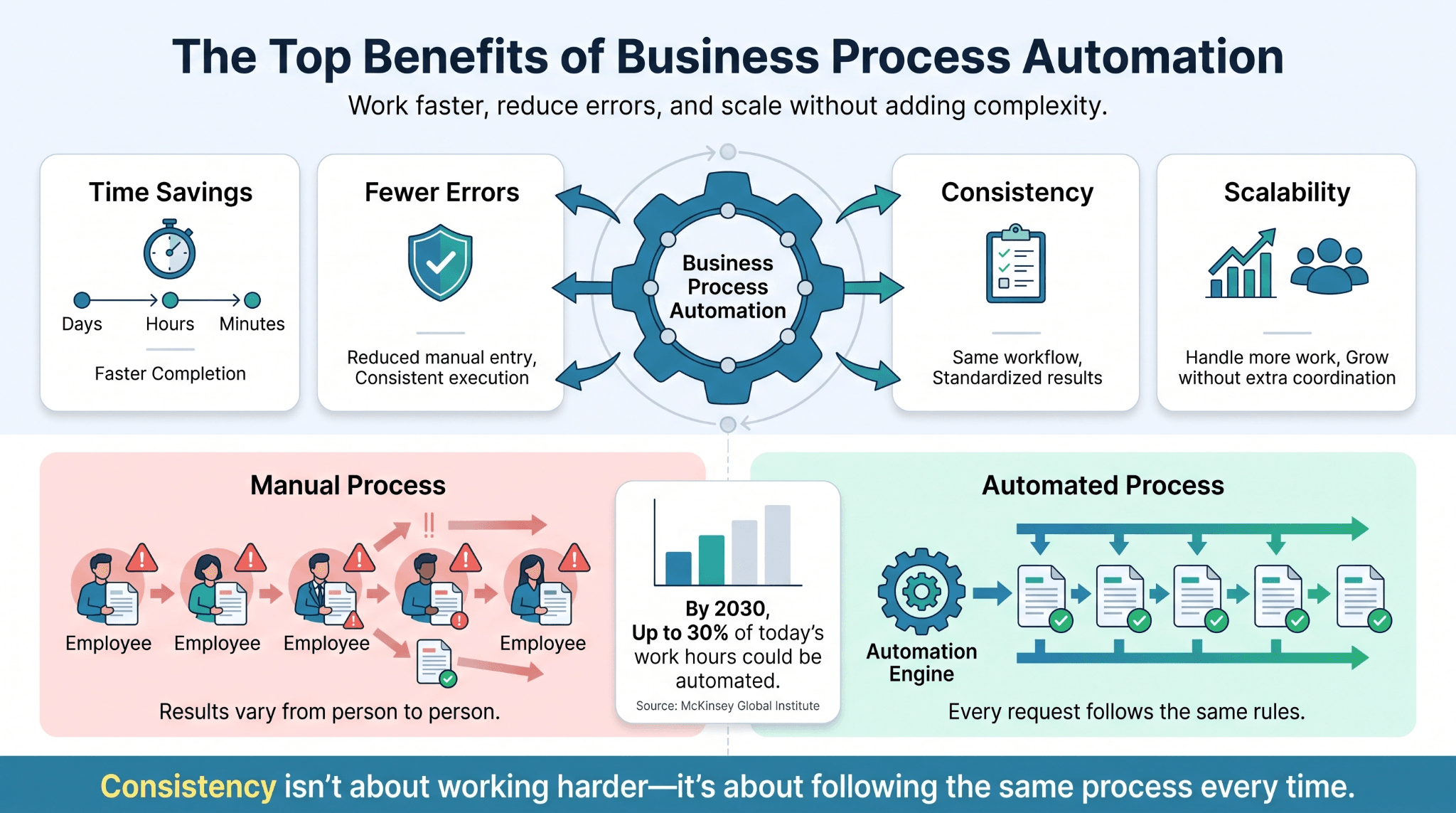
The process automation benefits companies report are consistent across industries, even though the specific processes vary widely.
-
Time savings. Removing manual handoffs typically cuts completion time from days to hours, sometimes minutes.
-
Fewer errors. Manual data entry has a natural error rate, since people get tired, get distracted, or move quickly under deadline pressure. Automated steps execute the same way every time.
-
Consistency. When every customer request or invoice follows the same rule, service quality stops depending on which employee handled it.
-
Scalability. A team of ten can often support the transaction volume of a team of twenty, because coordination work has been removed rather than added onto someone's plate.
Research from McKinsey's Global Institute shows that by 2030, activities accounting for up to 30 percent of hours currently worked across the economy could be automated, a trend accelerated by generative AI. These benefits are easiest to see in accuracy, where the difference between automated and manual execution is measurable.
How Does Automation Improve Accuracy and Consistency?
A useful comparison is a recipe. If five people follow the exact same recipe with the same measurements, the result is nearly identical every time.
If five people cook from memory, the results vary based on mood, experience, and attention that day. Manual business processes work the same way. Two employees processing the same type of request will make slightly different judgment calls, even with good training, simply because human attention is not uniform.
Business process automation removes this variation for tasks that do not require judgment. The system applies the same rule regardless of who triggered it, what time it is, or how busy the team is that day. This matters most in regulated or high-volume environments, where consistency is a requirement rather than a convenience, such as financial approvals or compliance documentation.
What Should You Look for in Business Process Automation Solutions?
Evaluating business process automation solutions is less about finding the tool with the most features. It is about finding the one that fits how the business already operates.
Here is a short breakdown of what to weigh before selecting a platform:
|
Factor |
What to Evaluate |
|
Integration |
Does it connect natively with existing CRM, finance, and support tools? |
|
Scalability |
Can it handle several times the current volume without a full rebuild? |
|
Security |
Does it meet data handling requirements for your industry? |
|
Support model |
Is there ongoing monitoring, or is it self-managed after setup? |
Integration matters most early on. A platform that requires custom connectors for every tool in the stack quietly introduces long-term maintenance work.
Security is often underweighted in the buying decision, particularly for companies handling payment data or health information, where compliance requirements shape which business process automation solutions are actually viable.
Choosing the right platform reduces risk. It does not eliminate it. Most automation failures come from how a project is run, not from the software itself.
What Mistakes Should Businesses Avoid When Automating Workflows?
A few mistakes account for most failed automation projects:
-
Automating a broken process. Workflow automation makes an existing process faster and more consistent. It does not fix a process that had unclear ownership or conflicting rules to begin with.
-
Skipping training. Even well-designed automation changes how people work day to day, and staff need to understand what the system is doing, not just that it exists.
-
Overautomating. Some steps genuinely require human judgment, particularly exceptions, escalations, and customer relationships at risk.
Companies that get workflow automation right start narrow, prove the result on one process, and expand from there.

How Can a Business Get Started With Workflow Automation?
Getting started does not require a full technology overhaul. It requires identifying where manual work is creating the most drag right now.
Below is a simple four-step approach most companies can apply within a single quarter:
|
Step |
Action |
|
1 |
List every repetitive task done more than ten times a week |
|
2 |
Map the current process, including every handoff and wait point |
|
3 |
Automate one process first, and measure the result before expanding |
|
4 |
Review outcomes after 30 to 60 days, then scale to the next process |
Starting with one process, rather than an entire department, keeps risk low and gives a clear before and after comparison. Most companies see their clearest first result in a high volume, low complexity process, such as lead routing or invoice matching.
Working with a team that treats automation as an ongoing operational system, rather than a one-time project, tends to produce more durable results than a single software rollout.
What Do Businesses Ask Most About Process Automation?
Below are the questions we hear most often from founders and operations leaders evaluating business process automation for the first time.
Is business process automation expensive to implement?
Costs vary by scope. A single automated workflow can often be built within existing software subscriptions. A full operational system spanning multiple departments requires more upfront investment, typically offset within a few months.
Does automation replace employees?
In most cases, automation removes repetitive tasks rather than entire roles, freeing staff for work that requires judgment, relationship management, or problem-solving.
How long does implementation usually take?
A single workflow can often go live within two to four weeks. Multi-department systems typically take longer, depending on how many tools need to be connected.
What is the difference between BPA and RPA?
Robotic process automation, or RPA, automates a single repetitive task, often by mimicking clicks in an interface. Business process automation is broader, coordinating an entire multi-step process across systems and teams.
Do small businesses benefit from business process automation?
Yes. Smaller teams often see the fastest relative impact, since one person previously handling multiple manual tasks can redirect that time toward growth-focused work almost immediately.
Where Business Automation Is Headed Next
Business process automation is shifting from a set of individual workflows into a connected operating layer that spans an entire company. McKinsey's Global Survey on the State of AI found that 88 percent of organizations now regularly use AI in at least one business function, up from 55 percent in 2023. This reflects how quickly automation has moved from early adoption to standard practice.
The direction for 2026 and beyond is less about isolated tools and more about unified systems, where automation, CRM data, and reporting operate as one connected structure rather than separate platforms loosely stitched together.
Companies that treat this as an ongoing operational responsibility, rather than a one-time project, tend to be the ones seeing compounding results over time. If scattered tools and manual handoffs are still slowing your team down, let's change that. Book a Free Consultation with WellsGroup, and we'll show you exactly where automation can start paying off first.