5 Ways to Simplify AI Automation for Small Business Owners
Discover five practical ways to simplify AI automation, reduce manual work, choose smarter tools, and scale your small business confidently.

AI automation for small businesses becomes manageable when owners follow five specific practices: automating one task at a time, choosing tools built for non-technical users, testing before full rollout, bringing in an AI automation agency for the harder integrations, and tracking measurable results before scaling further.
Most owners do not fail at automation because the technology is too advanced. They fail by trying to automate everything at once with disconnected tools. The five practices below separate a system that runs on its own from a stack of tools that becomes another job to manage. Get a Proposal and talk to WellsGroup about building an automation system that keeps operating long after the initial setup is finished.
Why Does AI Automation for Small Business Feel Overwhelming?
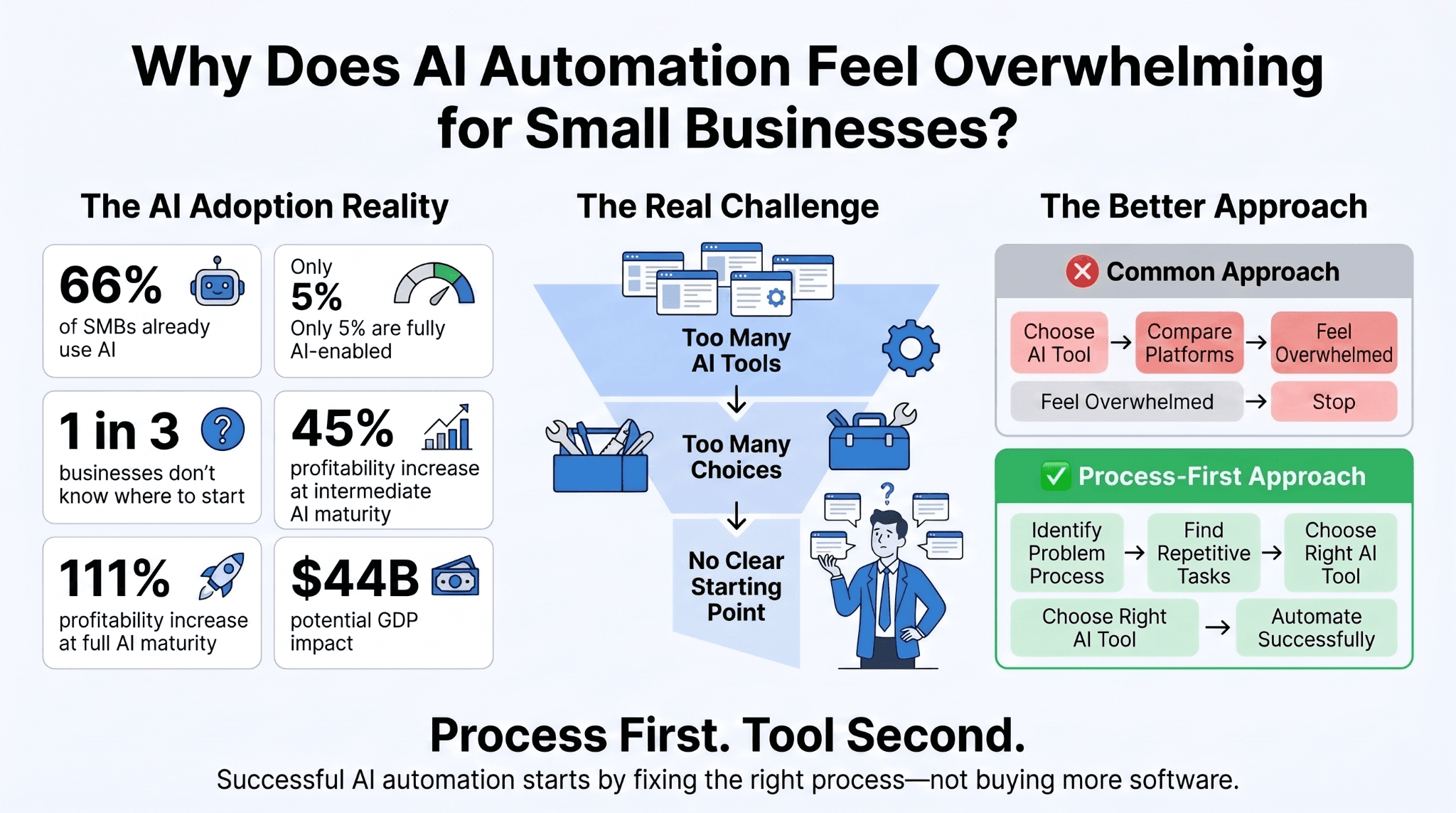
The market is not short on options. It is short on clarity. A November 2025 Deloitte Access Economics report commissioned by Amazon, surveying more than 1,000 Australian small and mid-sized businesses, found a gap between interest and direction rather than a gap in enthusiasm.
The report's findings include:
-
Two-thirds of SMBs surveyed are already using AI, but only 5 percent have reached a fully AI-enabled stage of maturity
-
Among businesses not yet using AI, a third cite not knowing where to start as the reason
-
Businesses moving from basic to intermediate AI use saw a 45 percent profitability increase, rising to 111 percent for those reaching full maturity
-
If just one in ten SMBs in these groups advanced one maturity level, the report estimates 44 billion dollars could be added to Australia's GDP annually
That data points to a structural problem, not a knowledge gap. Small business automation is usually marketed tool by tool, which pushes owners to compare dozens of platforms instead of settling on one clear starting process.
Simplifying AI automation for small business means reversing the usual order: start with the process that needs fixing, then choose the tool.
Way 1: Start With a Single Task Instead of a Full Overhaul
The most reliable way to automate with AI is to isolate one repetitive, well-defined task and automate that first.
Trying to overhaul scheduling, invoicing, and customer support at the same time multiplies the points of failure. It also makes it hard to know which change produced which result.
A single task gives a clean before and after comparison. Measure the hours it used to take, run the automation for a defined period, then compare outcomes without other variables clouding the data.
Not every task is a good first candidate. The strongest starting points share three traits:
-
The task happens frequently, ideally daily or several times a week
-
The steps are consistent and do not require case-by-case judgment
-
A mistake is easy to catch and correct before it reaches a customer
Before picking a task, it helps to know which categories tend to deliver the fastest, most measurable wins.
Which Tasks Should You Automate First?
Scheduling, invoicing, and routine data entry consistently rank as the easiest and highest value starting points. They are frequent, rules-based, and low risk if an error slips through and needs correcting.
A few examples that fit this profile well:
-
Appointment reminders sent ahead of a scheduled visit
-
Follow-up messages triggered when an invoice goes unpaid
-
Data entry that copies a new lead from a form into a CRM
A service business that manually reminds every client of an upcoming appointment is spending hours on a task a connected calendar tool can handle without supervision.

Way 2: Choose AI Tools for Small Business That Are Easy to Use
Once the task is chosen, tool selection should follow, not lead.
AI tools for small business span a wide range of complexity. The common mistake is evaluating enterprise-grade platforms built for teams with dedicated IT staff.
The right AI tools for small business are judged less on feature count and more on how quickly a non-technical owner can configure them without outside help.
A short evaluation checklist keeps this grounded and prevents overspending on features that will never be used.
|
Evaluation Criteria |
What to Look For |
Why It Matters |
|
Setup time |
Days, not weeks |
Faster time to value, lower risk of abandonment |
|
Learning curve |
No-code, visual interface |
No developer required to configure or adjust it |
|
Integration |
Connects to your existing CRM, inbox, or calendar |
Prevents new data silos from forming |
|
Pricing model |
Scales with usage, not a flat enterprise fee |
Keeps cost proportional to actual business size |
|
Support |
Human support available, not just documentation |
Reduces the risk of a failed do-it-yourself setup |
Cost is the other variable owners tend to misjudge. According to Digital Agency Network's 2026 pricing analysis, setup projects typically range from 2,500 dollars for a single workflow to 15,000 dollars for multiple connected systems.
Monthly retainers for ongoing monitoring generally run between 500 and 5,000 dollars, depending on complexity.
What Should You Check Before Choosing a Tool?
Beyond the checklist above, ask whether the tool requires migrating existing data or can read directly from where that data already lives. Migration adds hidden setup time that rarely shows up in a vendor's advertised timeline.
Way 3: Test Automation Before Fully Relying on It
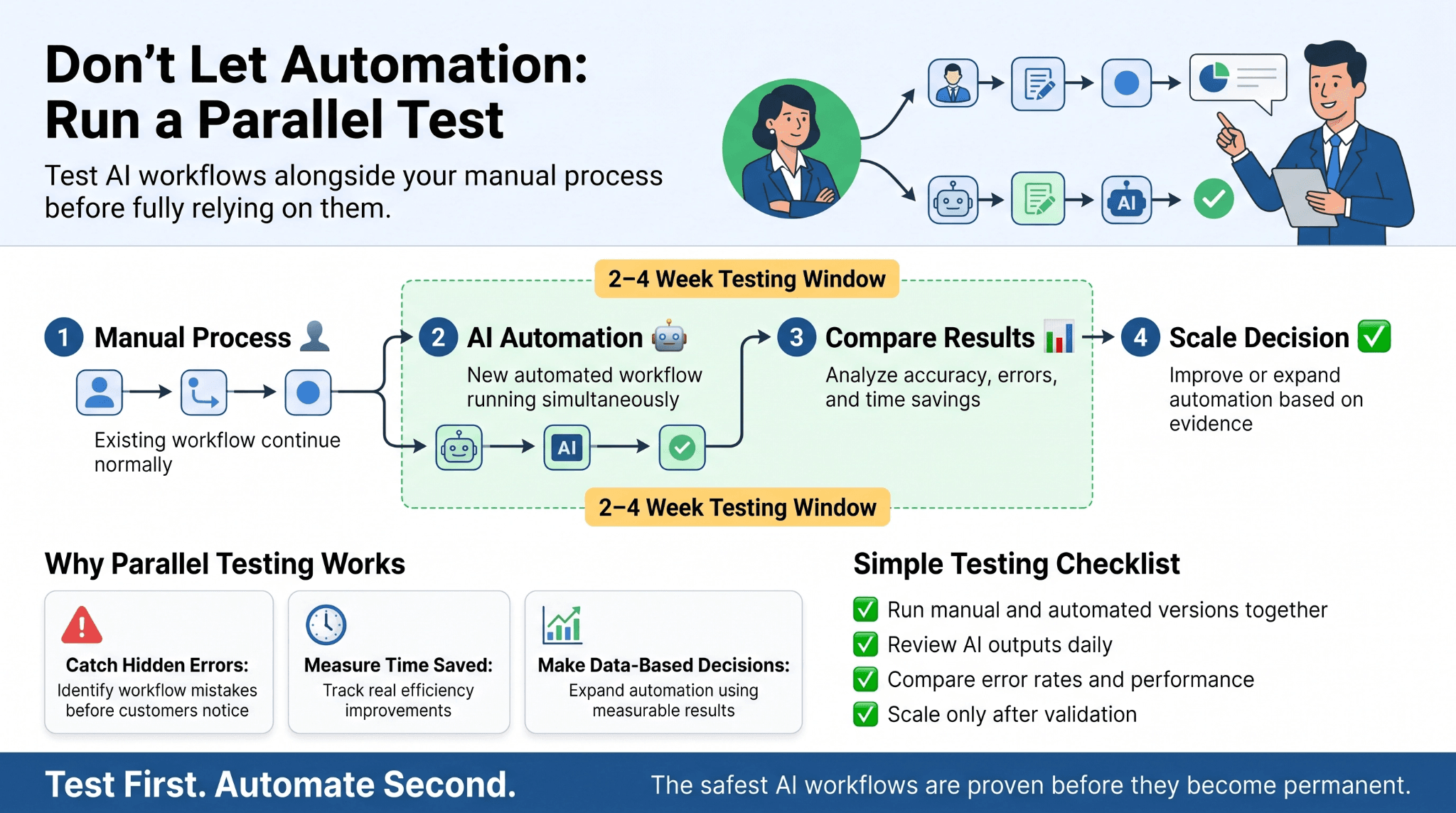
Every new automation should run in parallel with the existing manual process for a defined window, typically two to four weeks, before the manual process is retired.
This single habit prevents the most common and costly automation failure: an untested workflow going live and quietly producing errors no one notices until a customer complains.
Parallel testing also produces the comparison data needed to justify expanding automation further, rather than deciding to automate with AI more broadly based on impression instead of evidence.
A short testing protocol keeps this manageable without real overhead.
-
Run the automated and manual versions side by side for the same task
-
Assign one person to review automated outputs daily during the test window
-
Compare error rates and time saved at the end of the window before deciding to scale
Way 4: Bring in an AI Automation Agency for the Harder Parts
Some workflows are simple enough to configure without help. Others involve multiple systems or compliance requirements beyond what a template-based tool can handle.
This is where an AI automation agency changes the outcome. An AI automation agency is not simply hired to install a tool.
Its role is to map the workflow, identify where data needs to move between systems, and build an architecture that keeps working as the business grows, rather than a fix that breaks the first time a process changes.
The distinction becomes clear once a business scales past a handful of simple automations.
|
Traditional Project-Based Approach |
Systems-Based Automation Approach |
|
Tools are added one at a time, as needs arise |
Tools are integrated into one coordinated architecture |
|
Support is reactive, engaged only when something breaks |
Systems are monitored proactively before issues surface |
|
Success is measured by whether a deliverable shipped |
Success is measured by uptime, error rate, and time saved |
|
Knowledge of how the system works sits with one vendor or employee |
Documentation and ownership transfer to the business |
What Mistakes Happen When Businesses Automate Without Help?
Two mistakes show up repeatedly when businesses automate without guidance:
-
Automating a process that was already broken, which makes a bad process fail faster and more visibly
-
Skipping staff training, which leads employees to quietly revert to the old manual method
Both are avoidable with a short review of the workflow before any tool is switched on.
Way 5: Track Results So You Know What's Actually Working
Automating a task without measuring it afterward is close to running an experiment without recording the results.
Three metrics give the clearest picture:
-
Hours saved per week on the automated task
-
Error rate compared to how the manual process used to perform
-
Response time on any customer-facing step involved
Measuring matters because the payoff is real but uneven across businesses. Salesforce's Small & Medium Business Trends Report found that 91 percent of SMBs using AI say it boosts their revenue, 87 percent say it helps them scale operations, and 86 percent see improved margins. Those figures only hold up at the level of an individual business if that business is tracking its own numbers closely enough to know where it stands.
Tracking does not require a dedicated analytics platform. A simple monthly comparison of time spent before and after automation is enough to decide whether to expand, adjust, or pause it.
What Do Experts Say About AI Automation for Small Business Going Into 2026?
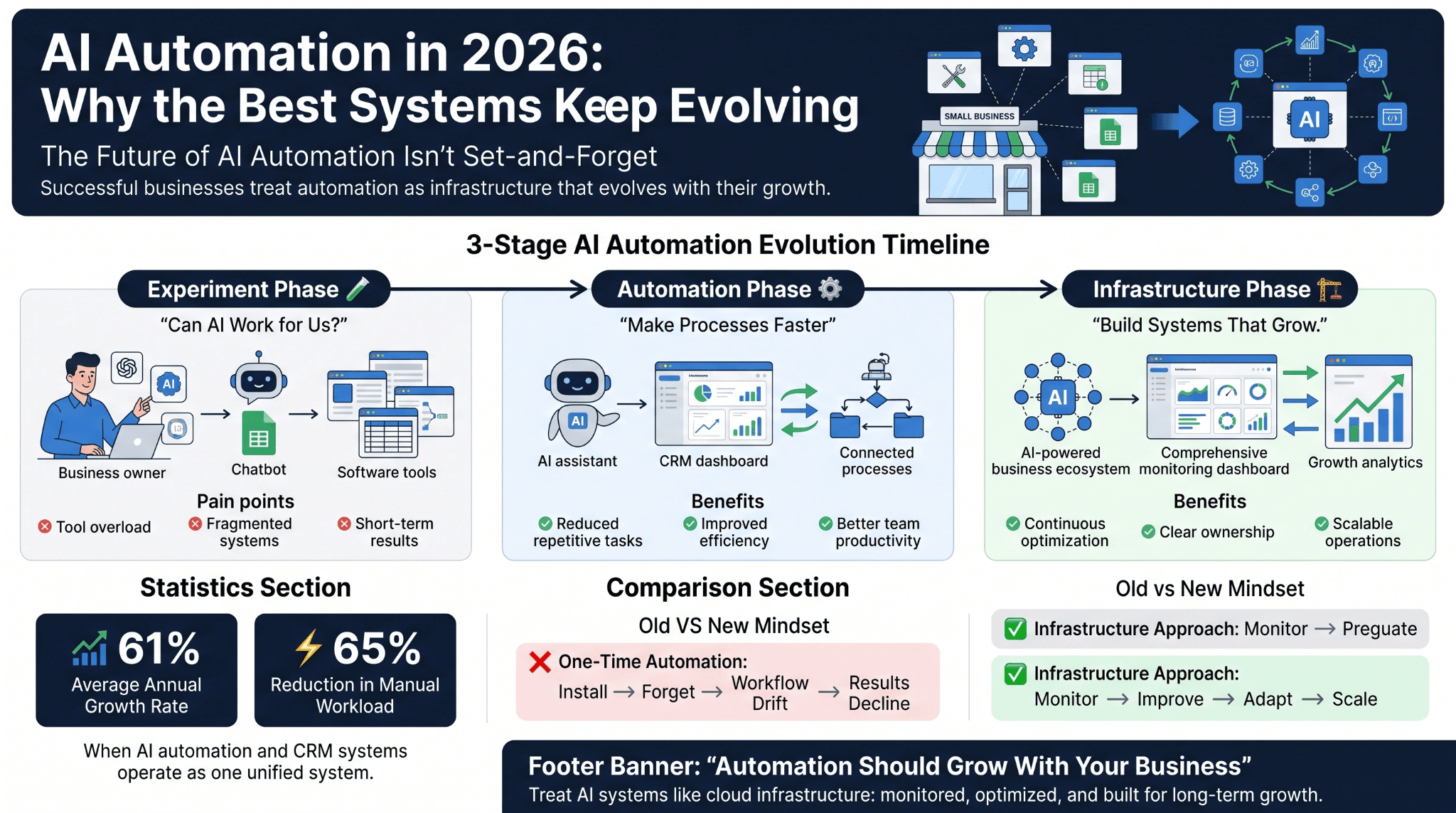
The consensus among operators building automation systems in 2026 has shifted from earlier years, when the goal was simply proving a small business could use AI at all. That phase is largely settled.
The current phase is about durability. Businesses that treat automation as a one time setup tend to see results fade as the workflow drifts out of sync with how the business actually operates. The ones that treat it as an ongoing system, revisited and adjusted as the process itself changes, are the ones still seeing value a year later.
WellsGroup's own operational data reflects the same pattern. Clients on its unified operating systems have recorded:
-
An average annual growth rate of 61 percent
-
A 65 percent reduction in manual workload once automation and CRM systems are integrated rather than run as separate tools
The shift into 2026 is away from isolated automations and toward small business automation treated as infrastructure, monitored and built to survive the business outgrowing its first version of the workflow.
For operations leaders, this means treating automation the same way they treat cloud infrastructure: with monitoring, clear ownership, and a plan for how the system evolves as demand, headcount, and complexity increase over time.
What Small Business Owners Still Want to Know Before Automating
The questions below reflect what owners most consistently ask before committing budget to automation.
Is AI automation worth it for a small business?
Yes, when it targets a specific, repeatable, high-volume task rather than an entire department. Most owners see payback within three to six months, and that return tends to compound as more processes are added.
How much does AI automation cost for a small business?
Most projects range from a few hundred dollars for one simple workflow to several thousand for one connecting multiple systems, with modest monthly monitoring costs after that. WellsGroup scopes every proposal against the specific workflow involved.
Does AI automation require coding or a developer?
No. Most small business automation tools today are no-code and built for non-technical owners. Complex, multi-system workflows still benefit from an AI automation agency, mainly because the architecture behind the scenes needs to be planned correctly from the start.
How long does it take to see a return on AI automation?
Typically two to six months, depending on how well the process is scoped beforehand. Processes that are already documented and consistent see returns faster than ones automated before underlying issues are resolved.
What should I automate first in my business?
The task repeated most often with the least judgment involved, usually scheduling, routine email replies, invoicing, or data entry between two systems.
Start Simplifying Your Automation This Week
The five practices above are a discipline, not a weekend checklist: automate one task, choose tools built for your size of business, test before relying on the result, bring in expert help once the workflow gets genuinely complex, and measure what actually changed.
The most useful action this week is not choosing a platform. It is picking the single task causing the most quiet, repeated frustration, and mapping exactly what happens from start to finish before any tool touches it. Book a Free Consultation with WellsGroup's operations team will map that process with you and show where automation fits before recommending a single tool.