UX Design for Business Websites: Why Great User Experience Drives Growth, Trust, and Conversions
Learn how UX design improves conversions, reduces friction, builds trust, and transforms business websites into revenue-generating digital assets.

Most businesses launching or redesigning a website focus on two things: how it looks and whether it ranks. Traffic and aesthetics become the primary benchmarks. What gets left out, consistently, is whether the website actually works for the people visiting it.
That gap is what separates high-performing digital assets from expensive online brochures. UX design for business websites is the discipline of making a site feel intuitive, removing barriers between a visitor's intent and their action, and ensuring every page earns the next click. It is structural logic applied to human behavior, not visual polish.
Forrester Research documented that visit-to-lead conversion rates can be more than 400% higher on sites with a superior user experience. That number does not come from changing colors or adding animations. It comes from understanding how people make decisions online and engineering the environment around those decisions.
Let's explore what UX actually is, how it influences customer behavior, what poor UX costs in 2026, and how to evaluate and improve your site without rebuilding it from scratch.
What Is UX Design and Why Does It Matter for Business Websites?
UX, user experience, is the totality of how a person feels when interacting with your website. It covers navigation logic, content sequencing, page speed, accessibility, and form design. Many businesses treat website design and UX as the same discipline. They are not, and that confusion is what separates sites that look good from sites that actually perform.
Understanding UX Beyond Visual Design
Website aesthetics are a component of UX, but not a substitute for it. UX operates across layers; visual design alone cannot address:
-
How pages are sequenced, and content is prioritized
-
Whether navigation reflects how visitors think, not how the company is organized
-
Whether forms and CTAs appear where a visitor is ready to act
-
How accessible the site is across devices, abilities, and connection speeds
The Difference Between Website Design and UX
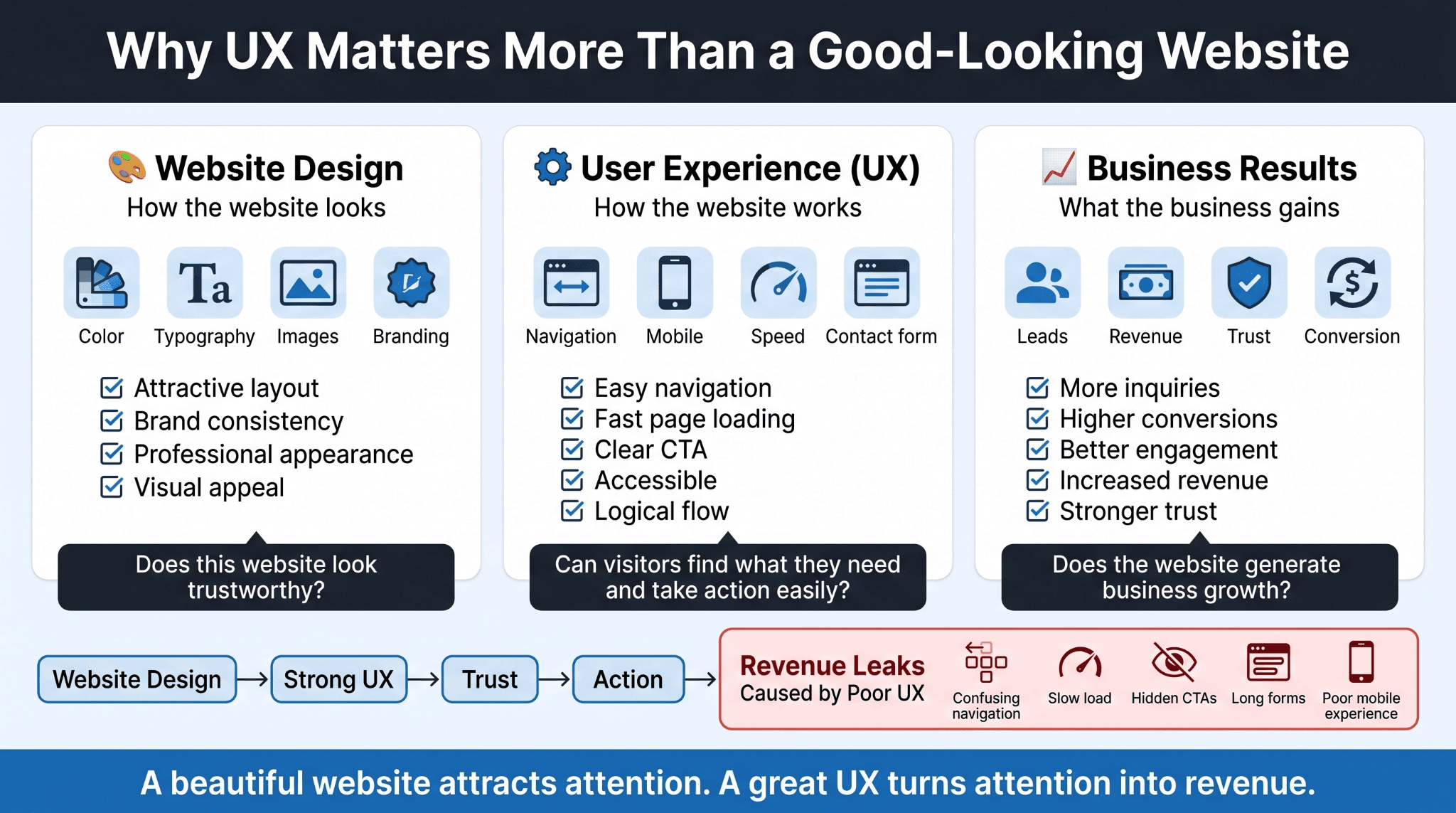
The distinction is straightforward:
-
Website design answers: Does this site look credible and on-brand?
-
UX answers: Can a visitor find what they need and act without effort?
-
Both together answer: Does this site build trust and convert it into revenue?
This is the premise behind WellsGroup's approach: the goal is not a good-looking website. The goal is a website that operates.
Why Businesses Should Care About User Experience
Every friction point is a potential exit. Consider what each failure point costs:
-
Confusing navigation means visitors cannot find your services
-
Unclear CTAs mean visitors who were ready to act do not know where to go
-
Slow load times mean users abandon before content loads
-
Long forms mean inquiries never get submitted despite genuine interest
Each of these is a measurable revenue leak: traffic that arrived with intent and left without converting.
How UX Design Influences Customer Decisions Online
Before a visitor reads a word or evaluates a service, their brain has already rendered a verdict on whether your site feels worth their time. This plays out in three stages.
First Impressions Shape Trust
Research by Lindgaard et al. established that visual appeal is assessed within 50 milliseconds. The elements shaping that judgment include:
-
Visual consistency across the header, hero section, and navigation
-
Typography that reads cleanly at a glance
-
An absence of intrusive pop-ups or auto-playing media
Reducing Friction Throughout the Customer Journey
Once past the first impression, navigation quality drives behavior. Common friction points that cause drop-off include:
-
Service pages with no clear next step
-
Pricing information buried several clicks deep
-
Menus with too many options that create cognitive overload
-
Internal links that leave users stranded with no onward path
Encouraging Visitors to Take Action
Strong UX removes obstacles from actions visitors were already inclined to take. Someone who searched for a solution and landed on your page already has intent. The site's job is to make the next step obvious: a well-placed CTA, a short form, and trust signals positioned where skepticism typically surfaces.
The Business Costs of Poor UX Design for Business Websites
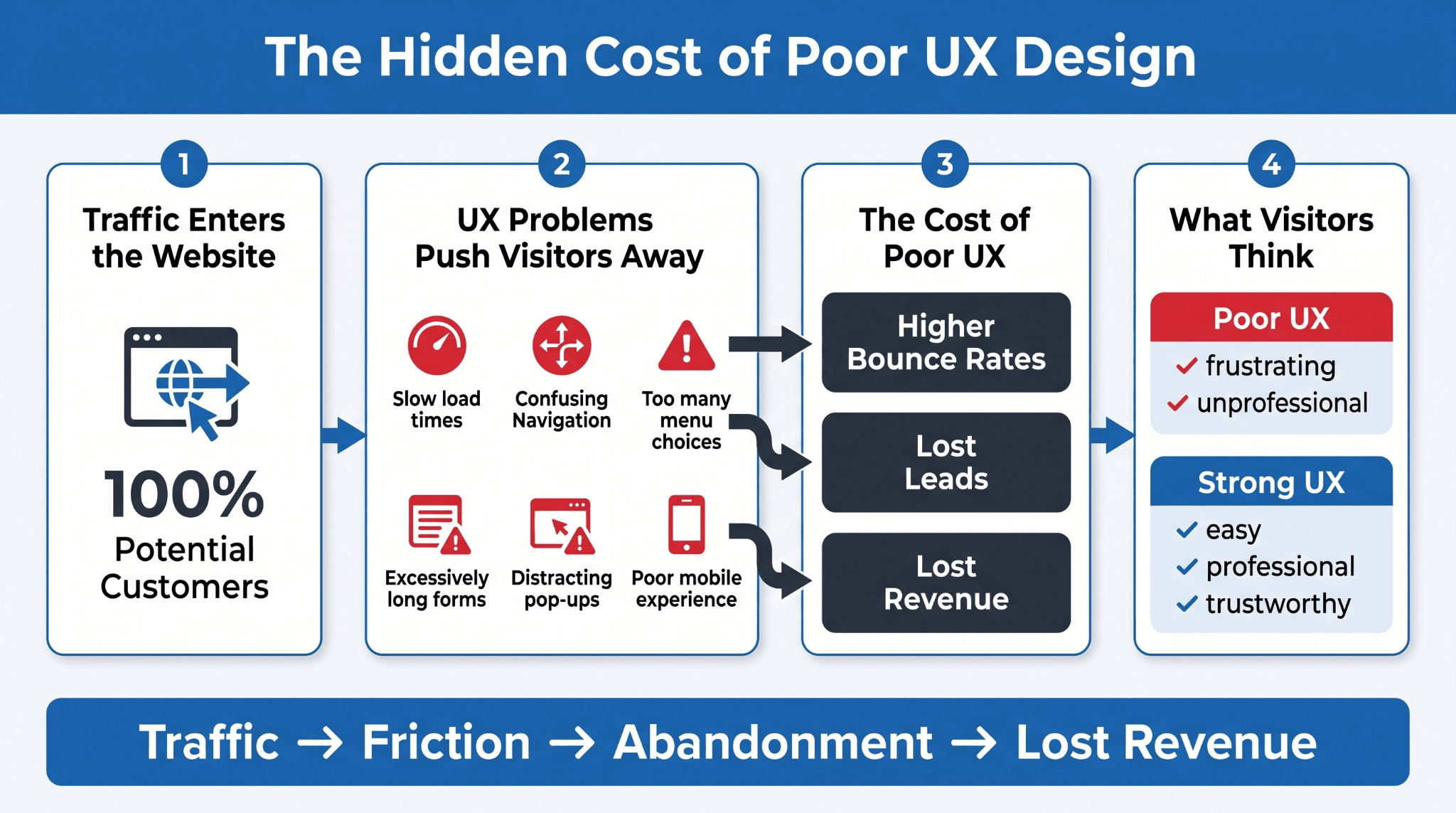
Poor UX does not just create a bad experience; it has a direct, measurable cost to revenue. The damage shows up in bounce rates, lost leads, and brand perception, and it compounds over time if left unaddressed.
High Bounce Rates and Lost Opportunities
Page speed is making a conversion decision before a visitor ever evaluates your content. A site that loads slowly signals unreliability, and most visitors will not wait to find out if the experience improves. Performance is not a technical nicety; it is a frontline UX variable with a direct line to bounce rate and lost revenue.
Common Traits Found in Bad UX Design Websites
Bad UX design websites share recognizable patterns across industries. Knowing them makes them easier to identify and fix in your own site.
The most consistently damaging patterns include the following:
-
Overloaded navigation menus that force too many decisions upfront
-
Pop-ups that interrupt on arrival rather than at natural exit points
-
Page load times that exceed mobile tolerance thresholds
-
Menu structures built around internal company logic rather than visitor intent
-
Forms with excessive required fields that reduce completion rates
-
Mobile layouts that break or collapse on smaller screens
How Poor UX Damages Brand Perception
Visitors associate the quality of your website with the quality of your business. A site that feels disorganized or difficult to navigate communicates something about operational standards, whether that inference is accurate or not. In B2B environments, where trust must precede any purchase decision, a poorly structured website creates a credibility gap that your sales team then has to close manually.
Essential UX Design Elements Every Business Website Needs
Getting UX right does not require rebuilding everything from scratch. Most high-impact improvements come from applying a consistent set of structural principles across your existing site. The elements below are the non-negotiables for any business website expected to generate leads or revenue.
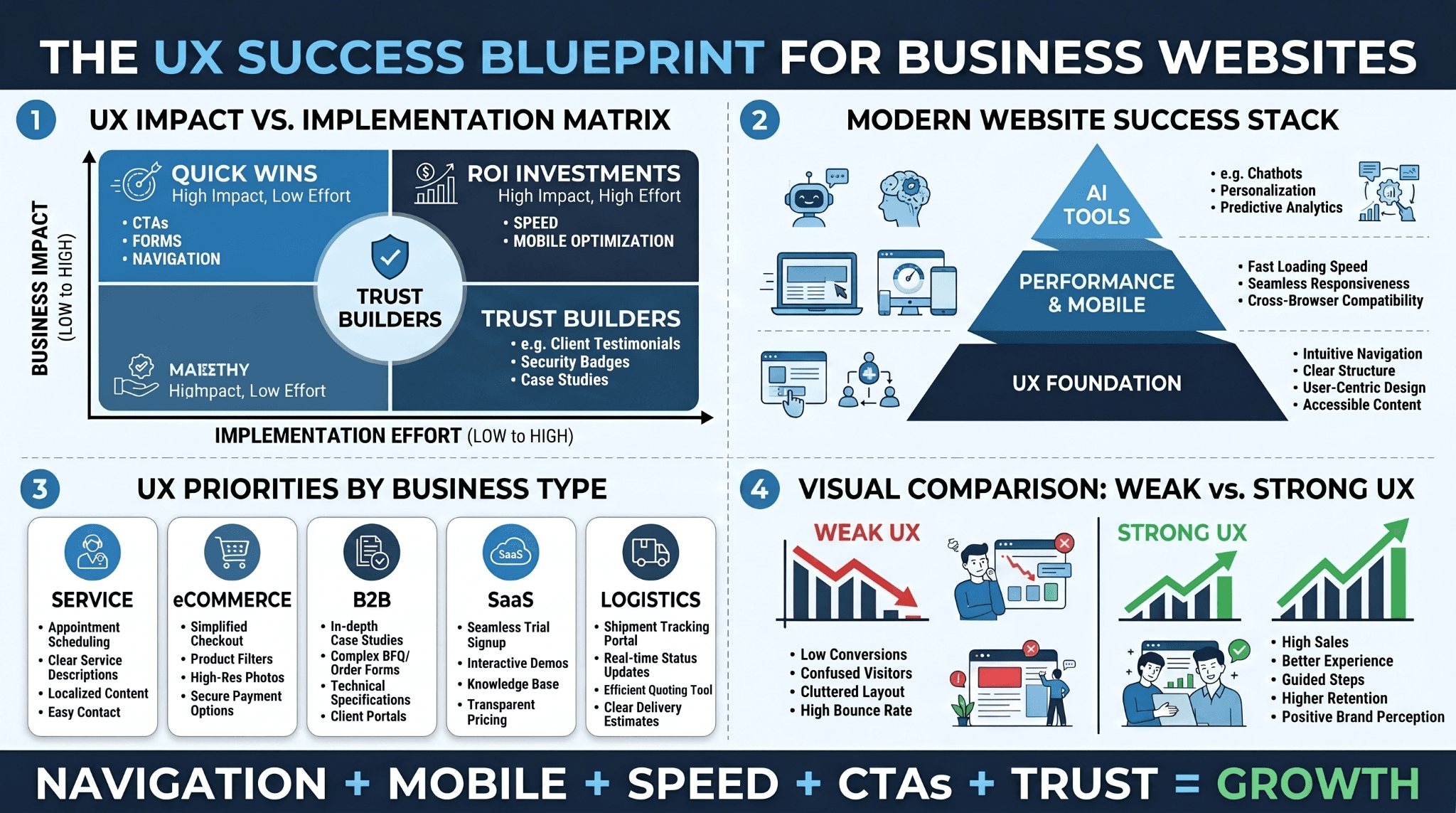
Here is how the essential elements of UX design for business websites compare in terms of business impact and implementation complexity:
|
UX Element |
Business Impact |
Implementation Complexity |
|
Simple, logical navigation |
High, reduces bounce, improves flow |
Low to Medium |
|
Mobile-first responsive design |
High captures the majority of traffic |
Medium |
|
Clear calls-to-action |
High, directly affects conversion rate |
Low |
|
Fast page load speed |
High, affects bounce rate and SEO |
Medium to High |
|
Accessible design (contrast, keyboard nav) |
Medium broadens the audience |
Low to Medium |
|
Short, optimized forms |
High increases in inquiry completion |
Low |
|
Trust signals (reviews, certifications) |
Medium-High, reduces decision friction |
Low |
Each of these operates as an independent lever, but they compound when implemented together. A B2B site that loads in one second has a conversion rate three times higher than one that loads in five seconds, and five times higher than one that loads in ten. That performance gap exists before any visitor evaluates content, CTAs, or offers.
In 2026, the standard has moved further. AI-powered features are now integrated into high-performing business websites, including smart search that interprets intent rather than just keywords, and AI-assisted lead capture that qualifies visitors and books discovery calls. These capabilities require a solid UX foundation to function correctly. They do not compensate for poor navigation or slow performance; they amplify whatever the underlying system already does.
UX Design for Different Types of Business Websites
UX strategy does not look identical across every business model. The structural priorities shift depending on how leads are generated, how buying decisions are made, and how long those decisions typically take. Below is a breakdown of how UX design requirements differ by business type.
|
Business Type |
Primary UX Goal |
Key UX Priorities |
|
Service-based businesses |
Lead generation |
Short forms, prominent CTAs, trust signals |
|
eCommerce / Shopify |
Purchase conversion |
Product filtering, fast checkout, mobile UX |
|
B2B websites and apps |
Trust-building over longer cycles |
Case studies, clear scope, decision-support content |
|
SaaS platforms |
Trial or demo conversion |
Onboarding clarity, feature demonstration, low-friction signup |
|
Logistics and marketplace |
Operational efficiency |
Real-time data display, role-based navigation |
For eCommerce specifically, a Shopify website design UX review typically uncovers friction at predictable points: unclear product filtering, checkout flows requiring account creation before purchase, and shipping costs that only appear at the final step. Baymard Institute's 2025 research confirms that checkout UX improvements alone deliver an average 35.26% conversion lift on large eCommerce sites, a figure that puts the ROI of a focused UX audit into concrete terms.
For top ux design companies for b2b websites and apps, the core competency is mapping the full buying journey and designing a site that provides value at every stage of that journey, not just the homepage.
Signs Your Business Website May Need a UX Upgrade
It is worth periodically evaluating your website through the lens of someone encountering it for the first time. These signals consistently indicate a UX problem that is costing revenue.
The following warning signs apply regardless of industry or business size:
-
Bounce rate is consistently above industry benchmarks for your category
-
Traffic is growing, but inquiry or lead volume is not keeping pace
-
Mobile users show higher exit rates than desktop users on the same pages
-
Customers regularly contact your team to ask questions that your website should already answer
-
Forms are visible, but completion rates are low relative to page visits
-
Key service or product pages have high exit rates despite sufficient traffic
Any one of these warrants investigation. Multiple signals appearing together point to a systemic UX issue rather than an isolated content gap.
What Business Owners Should Know About UX Design
The most common misconception about UX is that it is a one-time investment addressed during a website build and then closed. In reality, user behavior evolves, competitive environments shift, and what felt intuitive two years ago may now feel outdated relative to what visitors encounter elsewhere.
Here are five questions that consistently surface from business owners evaluating their website experience:
Do I need to rebuild my site to fix UX problems?
Not usually. Most improvements are surgical, fixing specific friction points, restructuring specific pages, or shortening forms. A full rebuild is warranted only when the underlying architecture prevents necessary changes.
How long before UX improvements show results?
Targeted changes to high-traffic pages can show measurable impact within days. Larger structural changes typically take four to eight weeks to reflect fully in behavior data.
What is the difference between UX and CRO?
CRO focuses on improving the percentage of visitors completing a target action. UX governs the entire experience. Good CRO is grounded in UX principles; treating them as separate programs produces weaker outcomes than integrating them.
Does mobile UX matter for B2B?
Yes. Even in B2B categories with higher desktop usage, mobile represents a growing share of early-stage research and after-hours browsing. Poor mobile UX damages credibility before your sales team enters the conversation.
What role does AI play in UX in 2026?
In 2026, AI has become integral to how leading business websites operate, reordering content based on predicted intent, personalizing based on micro-behaviors, and delivering conversational on-site search. Businesses that have not begun integrating adaptive UX logic are already behind the standard in most competitive categories.
Building a Website People Actually Want to Use
The most effective business websites are not designed around what a company wants to say. They are designed around what a visitor needs to understand, evaluate, and decide. That alignment between business goals and user intent is what makes UX design for business websites a revenue driver rather than a cost center.
User experience is not a design feature. It is the operational infrastructure of your online presence, and like all infrastructure, it either serves the business or it constrains it.
If your website is not converting the way your traffic volume suggests it should, the gap is almost certainly structural. And it is solvable.
Ready to build a digital system that actually performs? Get a proposal from WellsGroup.