ADA Compliance for Websites: A 2026 Checklist for Businesses
Learn how ADA website compliance, WCAG 2.1 AA standards, accessibility checklists, and ongoing audits help businesses reduce legal and usability risks.

ADA compliance for websites means building digital properties that people with disabilities can operate, read, and complete transactions on without technical barriers. In 2026, the accepted benchmark is WCAG 2.1 Level AA, the same standard the Department of Justice codified into federal regulation for government entities in 2024. For private businesses, the same standard functions as the practical legal and operational baseline that courts and plaintiffs now measure against.
If your organization needs a structured accessibility audit built into a working system rather than a one-time fix, get a proposal from WellsGroup to map your current infrastructure and build a remediation plan around it.
What Does ADA Compliance for Websites Actually Mean?
The Americans with Disabilities Act was written in 1990, long before commercial websites existed. Courts have since extended it to digital properties by treating websites as extensions of a business's "place of public accommodation," the same legal category that covers physical stores, restaurants, and offices.
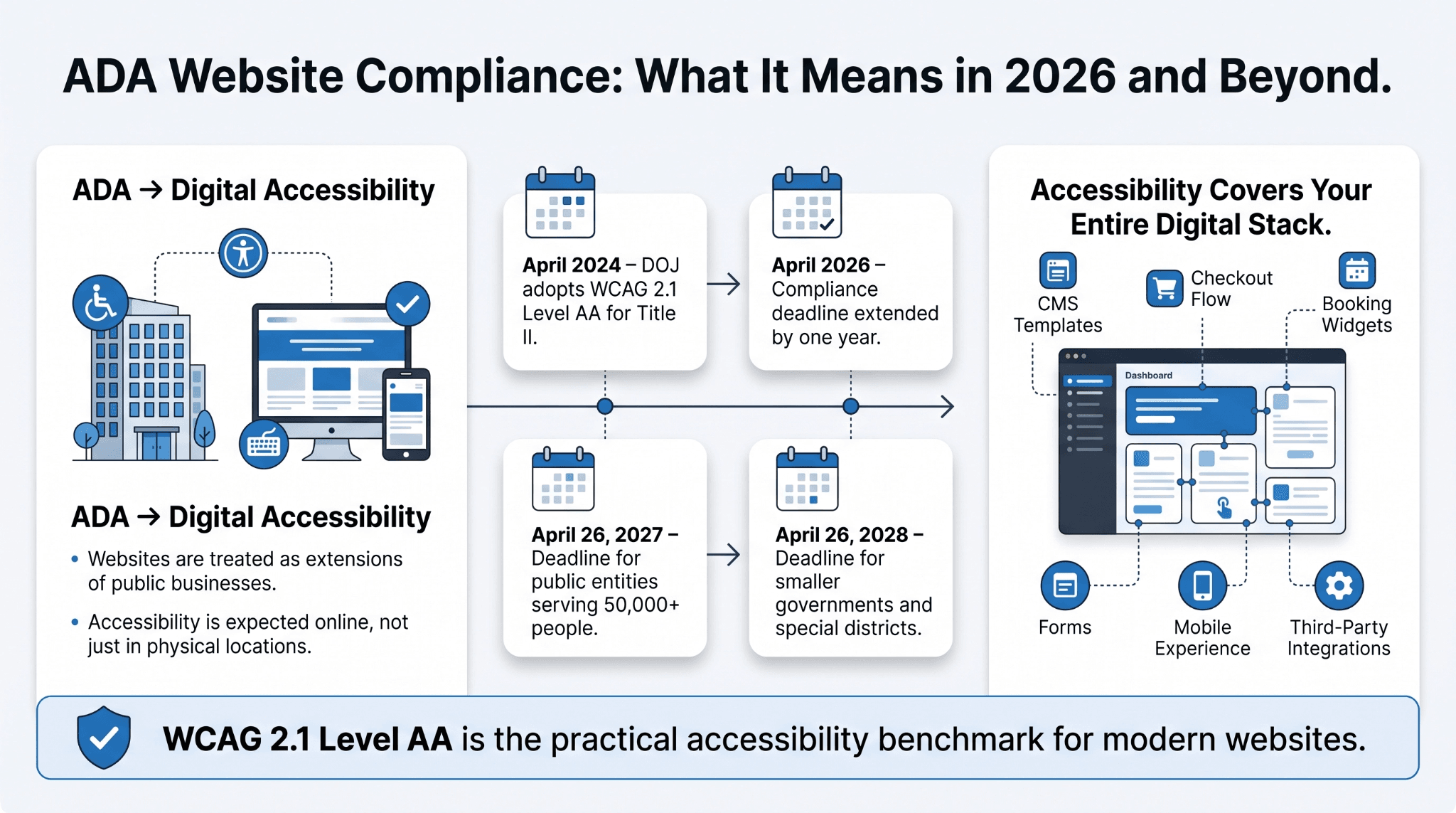
That interpretation has been reinforced at the federal regulatory level. Key developments, per the Department of Justice's final rule and interim final rule on Title II web accessibility:
-
April 2024: The DOJ issued a final rule under Title II of the ADA requiring state and local government websites and mobile apps to meet WCAG 2.1 Level AA
-
April 2026: The DOJ extended the original compliance deadline by one year
-
April 26, 2027: New deadline for public entities with populations of 50,000 or more
-
April 26, 2028: New deadline for smaller entities and special district governments
Title II applies directly to government entities, but its effect reaches private business in two ways:
-
Vendors and contractors providing digital services to public entities can be contractually required to meet the same standards
-
The rule has hardened WCAG 2.1 AA into the de facto standard that private litigation under Title III of the ADA now references as well
For a scaling company, this is not a one-time legal question. It is a standing requirement that touches every layer of your digital stack, from your CMS templates to your checkout flow to your third-party booking widgets.
Why Is Website Accessibility a Systems Problem, Not Just a Legal One?
Most businesses treat website accessibility as a compliance line item handled once during a redesign. That approach fails because accessibility is not a fixed state. It is a property of an operating system that changes every time a page is published, a form is edited, or a new plugin is installed.
Take a logistics company running a customer portal built on a CMS, connected to a CRM, feeding into a support ticketing tool. Any of these can independently break accessibility:
-
A new form field added through a CRM integration without a proper label
-
A third-party checkout widget that overrides keyboard navigation
-
A CMS template update that removes heading structure
-
A marketing plugin that inserts unlabeled pop-ups
This is why WellsGroup treats website accessibility as part of continuous systems architecture rather than a project deliverable. Accessibility checks get built into the deployment pipeline itself, not bolted onto the front end after launch.
The exposure is measurable. According to the 2026 WebAIM Million report, which evaluates the top one million home pages on the web each year, 95.9 percent of home pages had at least one detectable WCAG 2 failure, up from 94.8 percent the year before. That figure has hovered in the same range for years, which points to a structural problem, not an incidental one.

What Is WCAG Compliance and How Does It Relate to ADA Compliance for Websites?
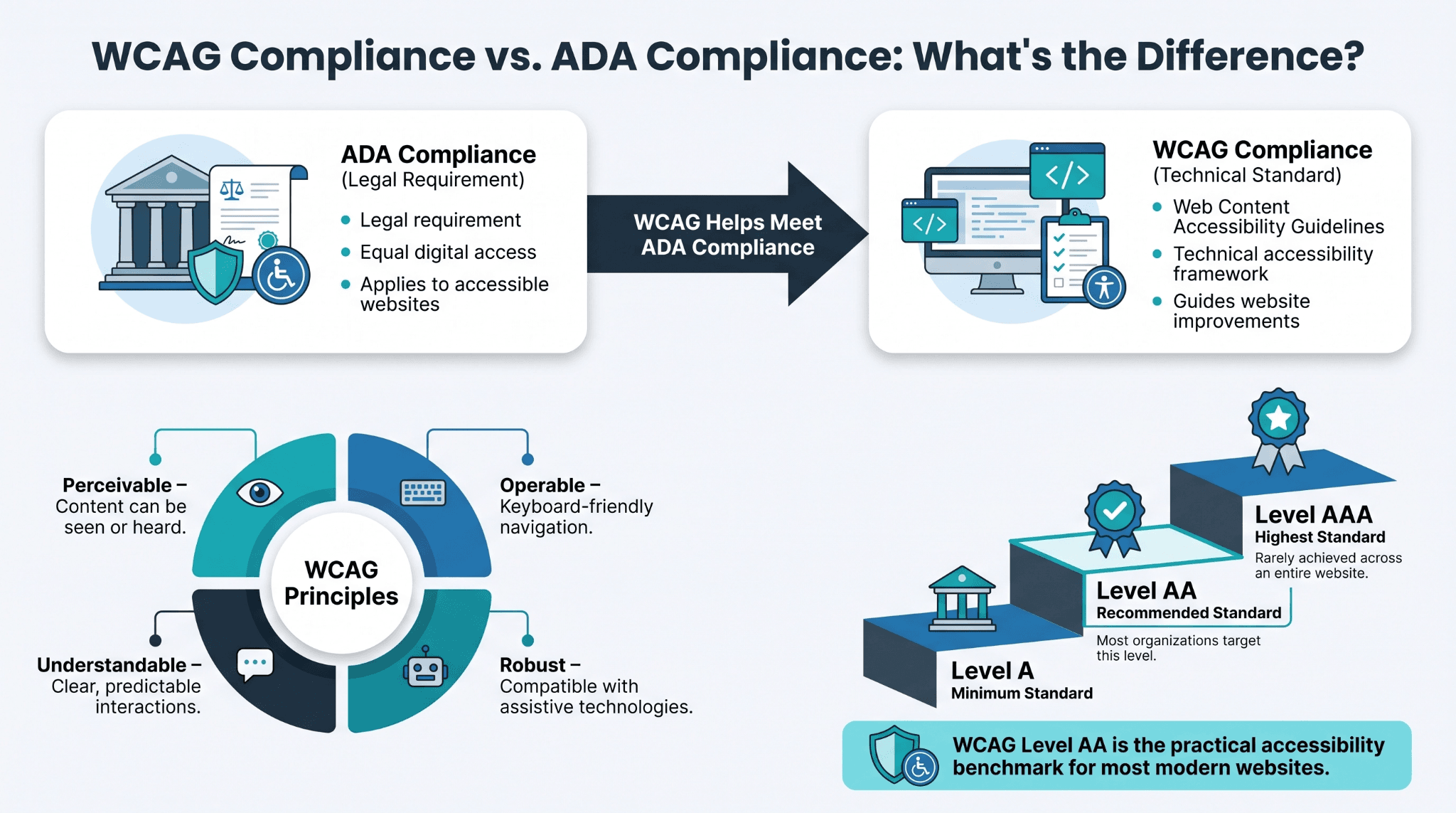
WCAG compliance refers to conformance with the Web Content Accessibility Guidelines, a technical standard maintained by the World Wide Web Consortium. ADA compliance for websites is a legal outcome. WCAG compliance is the technical mechanism businesses use to achieve it, since no separate federal technical standard for private business websites currently exists.
WCAG is organized around four principles, often abbreviated POUR:
-
Perceivable: content can be seen or heard through some sense
-
Operable: the interface can be navigated by keyboard as well as mouse
-
Understandable: language and interface behavior are predictable
-
Robust: the site works correctly with assistive technologies like screen readers
Each WCAG success criterion is assigned a conformance level, and that level determines how much remediation work a business actually needs to do.
What Are the Different WCAG Conformance Levels?
WCAG defines three tiers:
-
Level A: the minimum standard
-
Level AA: the recommended standard, and the one the DOJ adopted for Title II
-
Level AAA: the highest level, rarely required in full
Level AAA includes stricter criteria, such as sign language interpretation for video content, that are difficult to apply consistently across an entire commercial site. Most organizations target AA as the baseline and apply select AAA criteria only where they add clear value.
What Does ADA-Compliant Website Design Look Like in Practice?
ADA-compliant website design is not a separate visual style. It is a standard design executed with attention to structure and interaction, not just appearance. A well-built accessible site looks identical to a well-built conventional site to most visitors, because the differences live in the code layer, not the surface layer.
Practical characteristics include:
-
Text that resizes up to 200 percent without breaking layout or hiding content
-
Color contrast ratios that meet WCAG AA thresholds for readability
-
Full keyboard operability, so every menu, form, and button can be reached and activated without a mouse
-
Consistent navigation patterns across pages so assistive technology users can predict page structure
-
Form fields with programmatically associated labels, not just visual placeholder text
A useful mental model is a restaurant menu. A sighted user reads it visually. A screen reader user needs the same information delivered as structured, labeled text read aloud in a logical order. If the underlying code does not carry that structure, the menu effectively does not exist for that user, regardless of how it looks on screen.
How Should Images, Video, and Interactive Elements Be Handled?
A few core rules cover most of this work:
-
Every meaningful image needs descriptive alt text that conveys its function, not just its subject
-
Decorative images should be marked so screen readers skip them
-
Video content needs captions for users who are deaf or hard of hearing
-
Pre-recorded video needs a full transcript for screen reader users and slow connections
What Should Be on an ADA Compliance Checklist for Businesses in 2026?
A working ADA compliance checklist needs to function as an operational reference, not a one-time audit document. The table below reflects the core WCAG 2.1 AA criteria businesses are most commonly tested against in litigation and government audits.
Before reviewing the table, note that each item maps to a specific WCAG success criterion, which makes the checklist directly auditable rather than a list of general intentions.
|
Checklist item |
What it addresses |
WCAG principle |
|
Alt text on all meaningful images |
Screen reader access to visual content |
Perceivable |
|
Full keyboard navigation with visible focus indicator |
Users who cannot operate a mouse |
Operable |
|
Minimum 4.5:1 color contrast for body text |
Low vision and color blindness |
Perceivable |
|
Captions and transcripts for video and audio |
Deaf and hard-of-hearing users |
Perceivable |
|
Programmatically labeled form fields |
Screen reader form completion |
Robust |
|
Logical heading structure (H1 through H3) |
Page navigation and content hierarchy |
Understandable |
|
Resizable text up to 200 percent |
Low vision users |
Perceivable |
|
Skip navigation links |
Faster access to main content |
Operable |
|
Descriptive, unique page titles and link text |
Orientation and context for assistive tech |
Understandable |
|
Accessible error identification in forms |
Clear correction guidance |
Understandable |
This list is not exhaustive, but it covers the criteria most frequently cited in ADA-related demand letters and the same technical requirements referenced in the Title II final rule.
How Should Businesses Test and Maintain Compliance Over Time?
Testing needs to combine automated and manual methods, since neither alone produces a reliable result. Automated scanners are fast and useful at scale, but they cannot judge whether content makes sense when read aloud or navigated in a logical order.
Before the comparison below, here is the core trade-off in one line: automation catches structure; humans catch experience.
|
Testing method |
What it catches |
Where it falls short |
|
Automated scanners |
Missing alt text, contrast ratios, HTML structure errors |
Cannot judge context, logic, or reading order |
|
Manual keyboard-only testing |
Tab order, focus traps, unreachable elements |
Time-intensive at full site scale |
|
Screen reader spot checks |
Real-world usability for blind and low-vision users |
Requires trained testers, not scalable alone |
Maintaining compliance means treating it as an ongoing operational discipline. In practice, that includes:
-
Running periodic audits after major releases or redesigns
-
Training content teams on accessible publishing habits
-
Publishing a public accessibility statement with a clear contact path for reported issues
-
Reviewing new integrations and plugins before they go live, not after
Businesses that rebuild their site without preserving these practices routinely regress within a year of their last audit.
What Happens If a Website Isn't ADA Compliant?
The legal exposure is well documented and growing, based on UsableNet's analysis of 2025 ADA lawsuit filings:
-
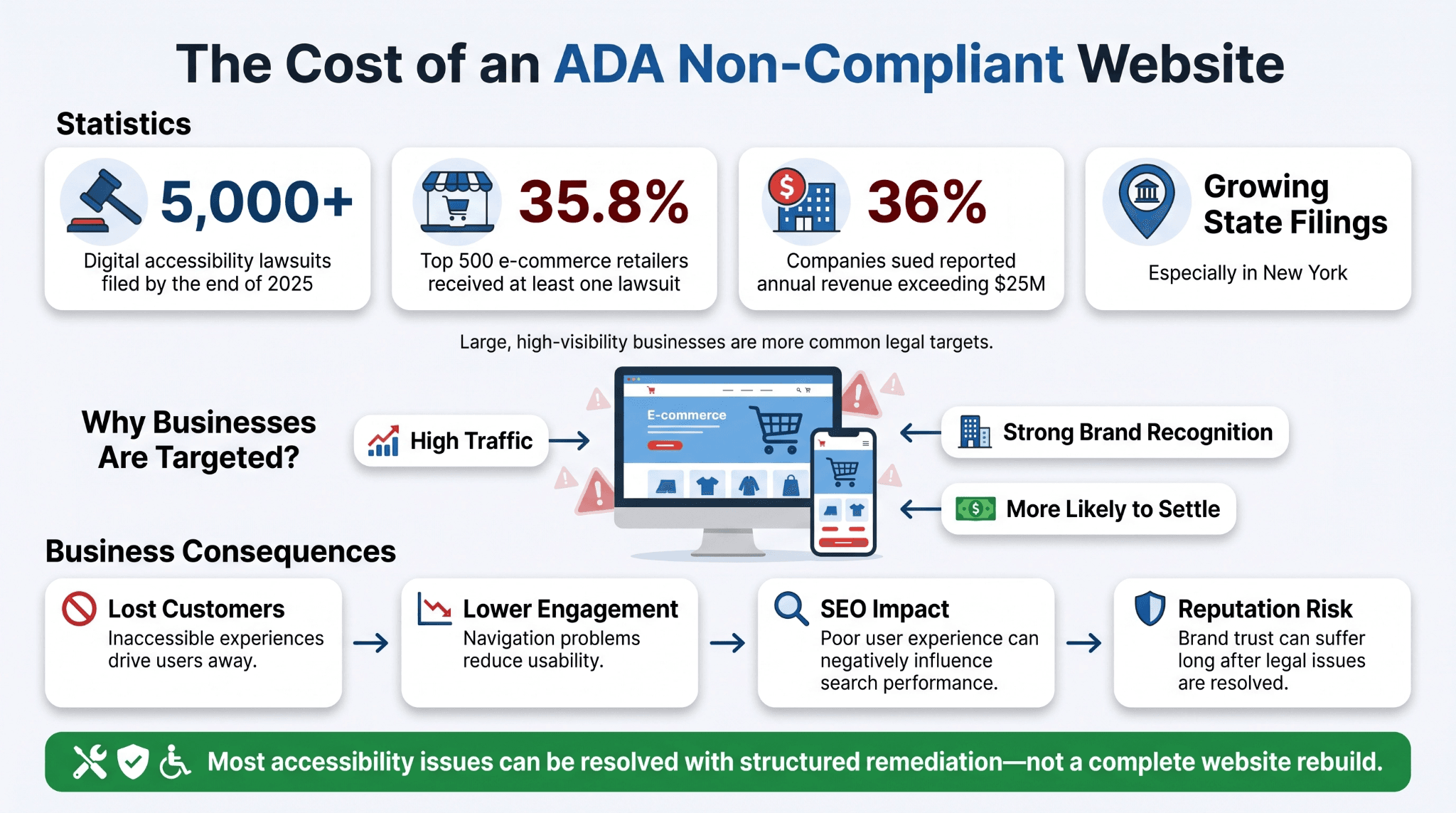
By the end of 2025, more than 5,000 digital accessibility lawsuits had been filed in federal and key state courts
-
Among the top 500 e-commerce retailers, 35.8 percent received at least one ADA accessibility lawsuit in 2025
-
36 percent of companies sued in 2025 reported annual revenue exceeding 25 million dollars, continuing an upward trend from prior years
-
A small number of plaintiff firms account for the majority of 2025 filings, and state court filings, particularly in New York, continue to expand as part of this litigation pattern
This pattern points to a deliberate strategy, not random enforcement. Large, high traffic retailers are easier targets because their scale and brand recognition make legal standing simpler to establish, and their resources make settlement more likely.
Beyond litigation, the consequences compound in quieter ways. Reachable customers are lost when navigation or checkout fails for assistive technology users; poor engagement signals from broken navigation can hurt SEO performance, and reputational exposure tends to outlast any single lawsuit settlement. The good news is that most accessibility failures are fixable with a structured remediation plan rather than a full site rebuild.
Common Questions Business Owners Ask About ADA Website Compliance
The questions below come up in nearly every compliance conversation WellsGroup has with clients. They reflect the practical concerns business owners raise once they understand the legal landscape.
Does a small business website need to be ADA-compliant?
Yes. Title III of the ADA applies to businesses of any size that operate as places of public accommodation, and lawsuits have targeted small and mid-sized businesses for years, not just large enterprises. A proactive audit is almost always less costly than responding to a demand letter after the fact, which is where a structured system like WellsGroup's ongoing accessibility monitoring earns its value.
How much does it cost to make a website ADA-compliant?
Cost depends heavily on site size, current code quality, and how many third-party integrations are involved. A small site with clean code may need modest remediation, while a large e-commerce platform with legacy code can require a more substantial rebuild. Businesses that treat accessibility as an ongoing system, rather than a one-time project, generally spend less over time because issues get caught before they compound.
Do accessibility widgets or overlays make a website ADA-compliant?
No. Overlay tools adjust the interface without fixing the underlying code, and litigation data show they do not reduce legal exposure. Real conformance requires addressing the code layer directly, which is the approach WellsGroup builds into its development process from the start.
What is the difference between ADA compliance and WCAG compliance?
ADA compliance is a legal requirement. WCAG compliance is the technical standard used to demonstrate it. There is no separate government-issued technical checklist for private business websites, so WCAG 2.1 AA functions as the practical benchmark referenced in nearly all ADA-related litigation and settlements.
Can AI tools fully automate ADA compliance for websites?
AI-powered scanners can accelerate detection of structural issues, but they cannot fully replace manual testing and human judgment, particularly around content clarity and logical reading order. WellsGroup uses automated scanning as one layer within a broader system that includes manual review, which produces a more defensible compliance posture than automated tools alone.
Building an Accessible Website Is a Long-Term Operational Advantage
Treating ADA compliance for websites as a one-time fix misreads the problem. Every content update, integration, or redesign introduces new risk, so accessibility only holds when it's built into how a business runs its digital systems, not into a single audit report.
The businesses managing this well build accessibility checks into deployment workflows, write it into content governance and vendor contracts, and monitor conformance continuously, the same way they monitor uptime or data security. That shift turns accessibility from a legal cost center into part of how the business earns and keeps customer trust.
Book a Free Consultation with WellsGroup to review your site architecture and build an accessibility framework that operates continuously, not one that expires after your next redesign.